
Newegg Developer’s Guide Quick Notes
The Newegg Marketplace API serves as a comprehensive technical framework designed to help third-party vendors automate and manage their business operations across different regional platforms. By utilizing this interface, merchants can streamline essential tasks such as inventory synchronization, order fulfillment, and the generation of financial reports. The documentation provides detailed guidance on authentication protocols, shipping services, and return management to ensure a seamless integration with Newegg’s ecosystem. Additionally, the portal offers specialized tools for sponsored advertising and warehousing logistics through the Shipped by Newegg program. Access to client libraries and developer support further assists sellers in building custom applications to maintain their storefronts efficiently.
This page is designed to highlight several of the most popular API endpoints used by sellers.
NOTE: There are distinct endpoints for each platform – always consult the guide (see example below).

Item Creation/Update Feed
- PAGE LINK: Item Creation / Update Feed – Newegg Developer Portal
- ENDPOINT LINK: POST https://api.newegg.com/marketplace/datafeedmgmt/feeds/submitfeed?sellerid={sellerid}&requesttype=ITEM_DATA
- PURPOSE: This endpoint is used to batch create new products or update existing item information (excluding pricing and inventory) based on specific subcategory schemas.
- REQUEST : (see guide for full details)
- RESPONSE: (see guide for full details)
- PRO TIP: Legacy grouping is being phased out. As of July 21, 2025, you must use the new Custom Variety attribute fields alongside the RelatedSellerPartNumber to define product variants; fixed subcategory group properties will no longer be supported (see guide for full details).
Inventory Update Feed
- PAGE LINK: Inventory Update Feed – Newegg Developer Portal
- ENDPOINT LINK: POST https://api.newegg.com/marketplace/datafeedmgmt/feeds/submitfeed?sellerid={sellerid}&requesttype=INVENTORY_DATA
- PURPOSE: Allows for the batch update of item inventory levels across different warehouse locations.
- REQUEST & RESPONSE: (see guide for full details).
- PRO TIP: Ensure you use the correct ISO standard 3-digit country code for the WarehouseLocation (e.g., “USA” or “CAN”); otherwise, the entire submission for that item will error out.
Price Update Feed
- PAGE LINK: Price Update Feed – Newegg Developer Portal
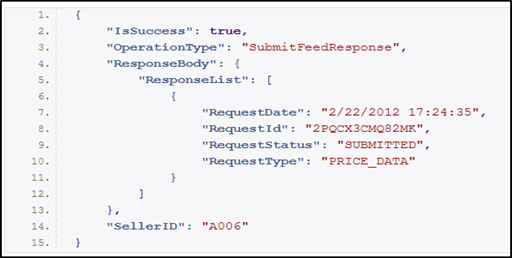
- ENDPOINT LINK: POST https://api.newegg.com/marketplace/datafeedmgmt/feeds/submitfeed?sellerid={sellerid}&requesttype=PRICE_DATA
- PURPOSE: Used to batch update pricing, shipping settings, and activation status for items in targeted countries.
- REQUEST & RESPONSE: (see guide for full details)
- PRO TIP: You must match the Currency code to the target CountryCode (e.g., USD for USA); incorrect combinations will result in a processing error.
Inventory And Price Feed (B2B and CAN)
- PAGE LINK: Inventory And Price Feed (B2B and CAN) – Newegg Developer Portal
- ENDPOINT LINK: POST https://api.newegg.com/marketplace/b2b/datafeedmgmt/feeds/submitfeed?sellerid={sellerid}&requesttype=INVENTORY_AND_PRICE_DATA
- PURPOSE: A specialized feed for Neweggbusiness.com and Newegg.ca to update inventory, price, and activation in a single batch.
- REQUEST & RESPONSE: (see guide for full details).
- PRO TIP: Be extremely careful with the Overwrite attribute. Setting it to “Yes” will deactivate every item in your store that is not included in the current datafeed.
Get Order Information
- PAGE LINK: Get Order Information – Newegg Developer Portal
- ENDPOINT LINK: PUT Newegg.com: https://api.newegg.com/marketplace/ordermgmt/order/orderinfo?sellerid={sellerid}&version={version}
- PURPOSE: This endpoint is used to retrieve comprehensive details for one or more orders based on search criteria such as order status, date ranges, or a specific list of order numbers.
- REQUEST & RESPONSE: (see guide for full details).
- PRO TIP: This endpoint utilizes a PUT method rather than a GET method to accommodate complex search criteria within the request body. Use version 306 that allows for more flexibility, and includes SalesTax, VATTotal, and DutyTotal in the Response body. Additionally, when performing a general search, both DateFrom and DateTo are mandatory; failing to provide them will result in a CE008 or CE009 error.
There is a slightly different endpoint for each platform for this.
Ship Order
- PAGE LINK: Ship Order – Newegg Developer Portal
- ENDPOINT LINK: PUT https://api.newegg.com/marketplace/ordermgmt/orderstatus/orders/{ordernumber}?sellerid={sellerid}
- PURPOSE: This endpoint is used to manually update the status of a specific individual order to “Shipped”. It is primarily used for Shipped-by-Seller (SBS) orders to move them out of the “Unshipped” state.

- REQUEST & RESPONSE: (see guide for full details).
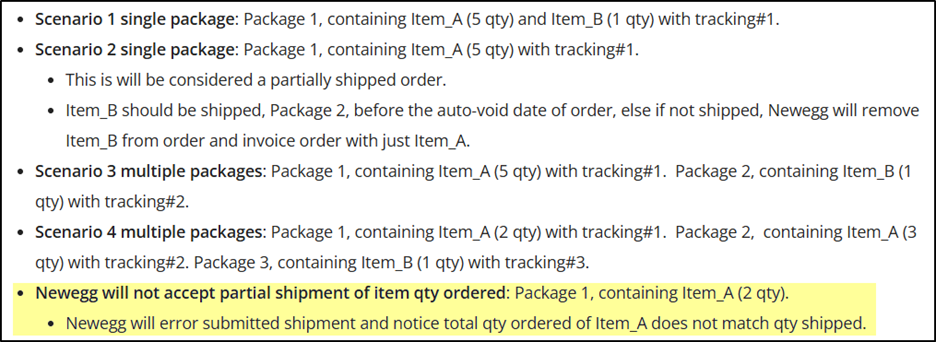
- PRO TIP: Individual status updates do not replace the need for tracking. While this endpoint (Action 2) updates the status, you should typically use the Order Ship Notice Feed for standard operations because it allows you to submit ActualShippingCarrier and TrackingNumber simultaneously, which is required for a complete fulfillment record. Additionally, note that only orders currently in “Unshipped” status can be moved to “Shipped”.
Cancel Order
- PAGE LINK: Cancel Order – Newegg Developer Portal
- ENDPOINT LINK: PUT https://api.newegg.com/marketplace/ordermgmt/orderstatus/orders/{ordernumber}?sellerid={sellerid}
- PURPOSE: Cancels a specific order using a reason code (e.g., Out of Stock or Customer Requested).
- REQUEST & RESPONSE: (see guide for full details).
- PRO TIP: For SBN (Shipped by Newegg) orders, cancellation may fail if the warehouse has already started processing the order. Always check the SBN Order Cancellation Request Result to confirm.
——————————————————————————–
Get RMA Information
- PAGE LINK: Get RMA Information – Newegg Developer Portal
- ENDPOINT LINK: PUT https://api.newegg.com/marketplace/servicemgmt/rma/rmainfo?sellerid={sellerid}&version={version}
- PURPOSE: This endpoint is used to retrieve detailed RMA information based on specified query conditions such as the RMA number, order number, customer name, or a specific date range.
- REQUEST & RESPONSE: (see guide for full details).
- PRO TIP: To receive the Seller’s own RMA number or the Replacement Order Number in the response, you must specify version 309 in the request URL; version 320 is required if you need return shipping label details.
——————————————————————————–
Process RMA
- PAGE LINK: Process RMA – Newegg Developer Portal
- ENDPOINT LINK: PUT https://api.newegg.com/marketplace/servicemgmt/rma/rmaaction?sellerid={sellerid} (Note: This specific endpoint link and request/response schema are not in the provided sources and are derived from external developer documentation.)
- PURPOSE: This endpoint is used to finalize an RMA after a return or replacement request has been submitted, allowing the seller to take final actions like receiving or rejecting the return.
- REQUEST & RESPONSE: (see guide for full details).
- PRO TIP: Generally, it is best to process RMAs within two (2) business days of the item being delivered to your warehouse; failure to act within this window may result in the system issuing an automatic refund to the customer.
Submit an RMA
(Not often used by sellers)
- PAGE LINK: Submit RMA – Newegg Developer Portal
- ENDPOINT LINK: POST https://api.newegg.com/marketplace/servicemgmt/rma/newrma?sellerid={sellerid}&version={version}
- PURPOSE: Creates a Return Merchandise Authorization for either a replacement or a refund on an invoiced order.
- REQUEST & RESPONSE: (see guide for full details).
- PRO TIP: Setting the AutoReceiveMark to 1 allows the system to receive the RMA automatically upon creation, which enables you to proceed with a refund immediately without a second “receive” action.